

Interviews move fast: one question ends, the next begins. ZipRecruiter’s Q3 2026 Job-Seeker Confidence Survey found that 26 percent of U.S. candidates already use AI to prepare. Now the best AI for online interviews listens in real time on the same laptop you’re presenting from, surfacing discreet prompts. This guide reviews six candidate-side desktop tools (excluding recruiter analytics and practice-only apps) and explains how each handles screen-share privacy, employer policies, and U.S. recording-consent rules. Use them as cue cards, not a script.
How we chose the best AI for online interviews
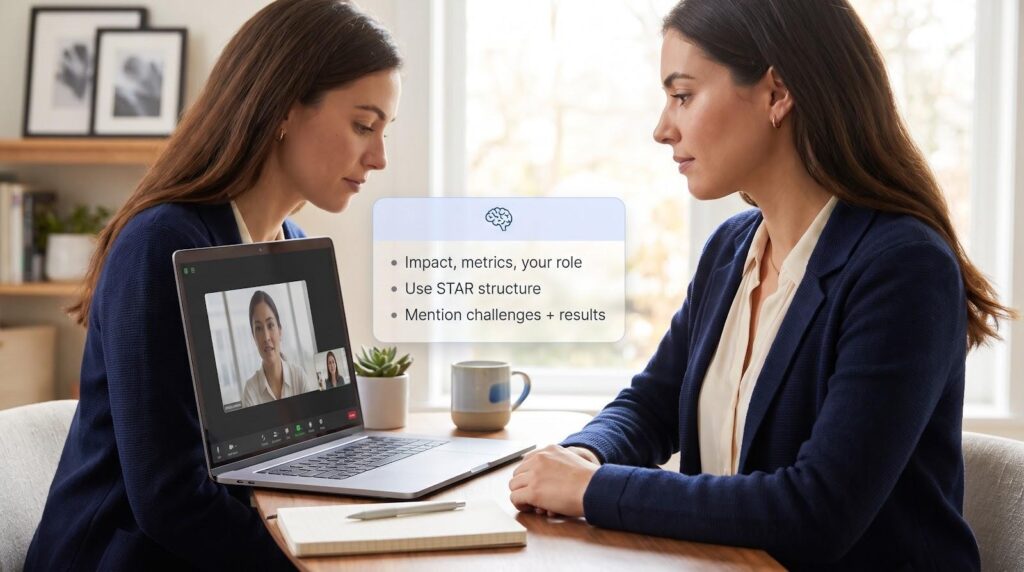
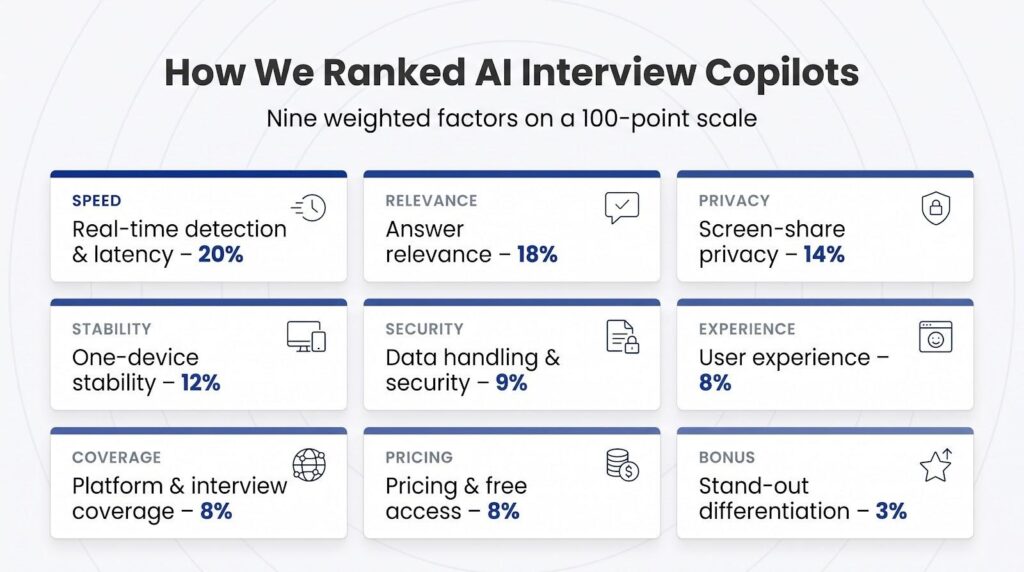
Every tool had to satisfy one non-negotiable rule: it must run on the same Windows or macOS laptop that’s already hosting Zoom, Google Meet, or Microsoft Teams. After that filter, we scored each contender on a 100-point scale shaped by nine weighted factors:
- Real-time detection and latency (20 percent): How quickly does a usable cue appear after the interviewer stops speaking?
- Answer relevance (18 percent): Do the prompts align with the résumé, job description, and question type?
- Screen-share privacy (14 percent): Does the overlay stay off recordings and full-screen shares?
- One-device stability (12 percent): Native audio capture, RAM/CPU footprint, and crash-free operation.
- User experience (8 percent): Setup speed, hotkeys, and distraction level once the clock starts.
- Platform and interview coverage (8 percent): Support for Zoom, Meet, Teams, Webex, coding rounds, and case questions.
- Pricing and free access (8 percent): Up-front cost, renewal model, and any live-trial minutes.
- Data handling and security (9 percent): Published retention windows, subprocessors, and opt-out tools.
- Stand-out differentiation (3 percent): Features not found elsewhere, such as local-only AI, or credits that never expire.
Vendors lost points if they skipped basic disclosures (privacy policy, audio-retention period, or minimum system specs) or if “undetectable” marketing lacked documented test conditions. The final ranking rewards clear documentation and on-call reliability so you can pick a copilot with confidence.
1. Interview Copilot: Best overall for one-laptop, unlimited live guidance
Interview Copilot feels less like a popup and more like an extra cortex for your call. Launch the macOS or Windows desktop app, join Zoom, Google Meet, or Microsoft Teams, and it starts listening. When the interviewer pauses, Copilot pulls details from your résumé and the posted job description to surface concise talking points in a private overlay that the company says stays off shared screens.
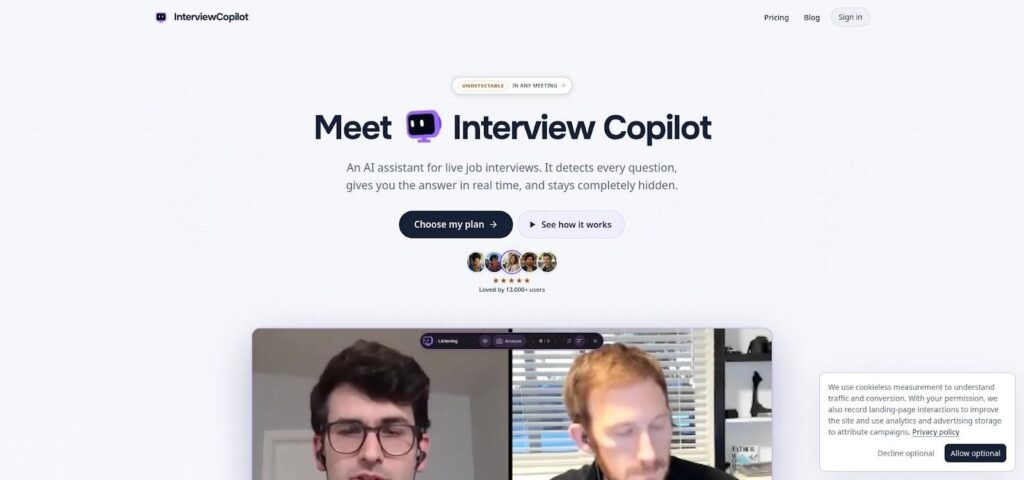
Interview Copilot Desktop App Overlay During Live Video Interview
Because every cue is grounded in your own experience, answers sound authentic. Behavioral questions arrive in STAR format; technical prompts flag trade-offs; a single shortcut can send a coding task, diagram, document, or job post on screen for analysis, which is handy when seconds count.
Pricing and limits. A flat $49 per month or $149 per year unlocks unlimited interviews, coding rounds, and screen analyses, with no credit packs to juggle. The app is free to download and test on a practice interview with no credit card, but live sessions require a paid plan.
Points to note. The company advises against using a work, school, or managed computer, because those devices often run monitoring software.
If you want real-time interview answers on the same laptop that hosts your call, Copilot tops our 2026 ranking.
2. Verve AI: Best free live test and broad role coverage
Try before you buy
Verve AI lets you road-test its desktop copilot before spending a cent. You get three live sessions of 15 minutes each plus five mock interviews, enough to try Stealth Mode, adjust the overlay, and gauge answer tone without starting a subscription clock.
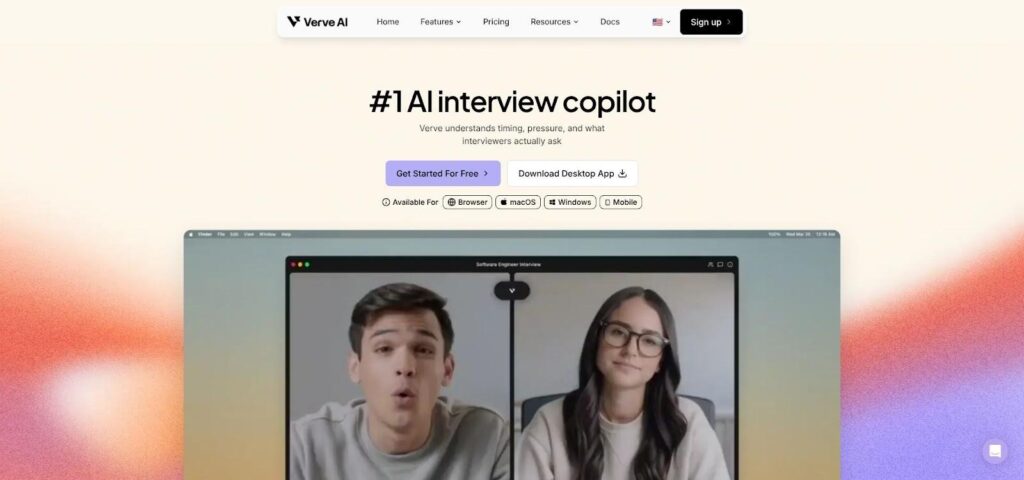
Verve AI Interview Copilot Website Showing Free Trial Sessions
Built for more than coders
Choose a preset for product management, consulting, cybersecurity, finance, data science, or classic behavioral and coding rounds. The question detector and answer templates shift instantly, so prompts sound native to each field rather than one-size-fits-all.
Key details to weigh
The macOS and Windows desktop app supports Zoom, Google Meet, Microsoft Teams, and Webex. Stealth Mode is designed to keep prompts off shared screens; the browser version does not. Paid plans start at $16.99 a month for Standard (60-minute sessions) and $34.99 a month for Pro (unlimited 90-minute sessions), as listed on Verve’s pricing page. Verve advertises support for 55+ transcription languages as of September 2026, but its privacy policy does not specify how long audio or transcripts are stored or which AI providers process them. Public reviews are still thin and split, so use the free tier to check stability on your own device.
Best for: first-time copilot shoppers, candidates who hop between technical and non-technical roles, and multilingual users who need broad language coverage.
Keep the session limits and privacy gaps in mind, and Verve remains the easiest way to test-drive a live AI interview assistant in 2026.
3. Parakeet AI: Best for flexible credits and wide platform support
Pay only for the time you use
Parakeet AI lets you match cost to calendar. Buy credits at $38 each (half a credit covers a 30-minute call session), take the $78 weekly plan, or go unlimited at $149.90 per month.
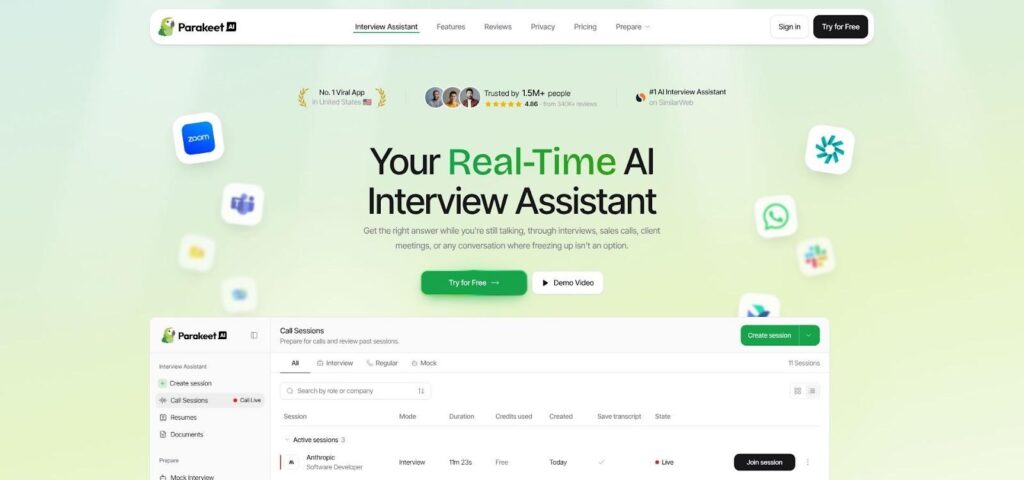
Parakeet AI Official Site Highlighting Credit Packs and Flexible Plans
Works on nearly every meeting platform
The desktop app for Windows and macOS (Linux users run it in desktop Chrome) listens in on Zoom, Google Meet, Microsoft Teams, Webex, Amazon Chime, Lark, and most browser calls. It detects the question, pulls résumé context, and offers either quick bullets or a fuller outline. Coding and system-design rounds include diagram suggestions and complexity trade-offs.
Transparency with a caveat
Parakeet’s privacy page lists each speech-to-text and large-language-model provider (OpenAI, Anthropic, Google, AWS, and more), so you know where data travels. That openness also means your audio and transcripts may cross several clouds unless you toggle local-only processing. Support for 50+ languages is a plus for multilingual candidates.
Best fit: candidates with scattered interview dates who dislike subscriptions, multilingual users, and engineers facing architecture or live-coding questions. If you are comfortable juggling credits and mindful of multi-cloud processing, Parakeet offers broad reach without locking you into a long contract.
4. AceRound AI: Best when you never want to see a renewal notice
Pay once, no surprises later
AceRound AI works like a prepaid phone plan. You get 30 free minutes to test its desktop overlay, then top up only when interview dates arise: $9.90 for 60 minutes, $24.90 for seven days, $39.90 for 30 days, or $69.90 for 90 days. There are no automatic rebills, so quiet months stay fee-free.
Solid coverage for technical rounds
Native macOS and Windows apps listen in on Zoom, Google Meet, Microsoft Teams, Webex, and common coding platforms. The tool surfaces concise prompts, complexity hints, and follow-up angles. Each pass unlocks every feature, so you never pay extra for system design or whiteboard support.
What to double-check
Independent reviews are scarce; our October 2026 scan found no meaningful G2 or Trustpilot footprint. AceRound’s docs say Stealth Mode keeps prompts off shared screens, so use the free 30 minutes to test your exact setup. The privacy policy says interview audio and transcripts remain on AceRound servers for about 30 days, which may feel long if you discuss confidential projects.
AceRound fits candidates with a short, intense interview window who dislike subscriptions and need on-demand coding support at a predictable price. Run a quick screen-share rehearsal before relying on its Stealth claim.
5. Final Round AI: Best all-in-one suite for practice, live help, and debriefs
One dashboard for the whole journey
Final Round AI bundles your entire hiring cycle into one desktop app. Set job Goals, rehearse likely questions, switch to live mode during Zoom, Google Meet, or Microsoft Teams, then return to an automatic debrief that marks weak answers and spins up fresh drills. The loop is handy when the same company schedules three or four rounds.
Feature depth, but watch the pricing
The company says Stealth Mode keeps prompts off shared screens, and Screen Help can read code windows or architecture diagrams mid-call. Pricing requires commitment: Final Round AI Pro starts at $25 a month for unlimited live copilot sessions, and there is no free trial: live sessions need an active Pro subscription. Screenshot the total before paying.
Read the privacy fine print
Final Round’s privacy policy says it may collect session audio recordings, depending on the features you use, and may use selected transcripts and other customer data for AI model training. Decide whether the analytics upside outweighs handing over call recordings.
Final Round fits candidates who want practice, live support, and post-mortems in one place and who are comfortable pre-paying annually and sharing recordings to unlock deeper analytics.
6. Hedy AI: Best privacy-first coaching companion
Keeps your data local
If you prefer not to stream résumé lines or audio to a cloud server, Hedy AI stands out. Speech recognition runs on your laptop by default, and transcripts stay local unless you flip a toggle. For deeper analysis you can route prompts through a local language model; expect a few extra seconds of processing and a noticeable memory spike.
Nudges, not scripts
Hedy positions itself as a coach. It surfaces one to three bullet cues tied to the strengths you preload, giving a gentle nudge rather than a teleprompter so you can speak in your own voice.
Budget-friendly tiers
Five free coaching hours refresh every month. Paid plans are $12.99 monthly, $99.99 annually, or $299 for a lifetime license (prices checked 22 Oct 2026). Upgrading removes the hour cap and lets you back up transcripts to an encrypted cloud vault.
Watch-outs
Because the overlay is a standard desktop window, it will appear if you share your entire screen, and local models may demand more than 16 GB of memory. Hedy reports 4.8 stars across more than 1,000 reviews.
Hedy suits candidates who handle confidential material or use a locked-down work laptop, as long as they can keep the window off any screen share.
At-a-glance: which copilot fits your situation?
Short on time? The table below (prices checked 22 Oct 2026) compares core facts at a glance. “Free live use” shows how many minutes you can spend in a real interview before paying.
| # | Tool | Best for | Platforms | Meeting apps | Free live use | Paid plan | Coding help | Overlay hidden* | Privacy highlight |
| 1 | Interview Copilot | Unlimited guidance on one laptop | macOS, Windows | Zoom, Meet, Teams, Webex | None | $49 mo / $149 yr | ✔︎ | Vendor claim | Audio streamed, not stored |
| 2 | Verve AI | Free live test, many roles | macOS, Windows, browser, iPhone | Zoom, Meet, Teams, Webex | 3 × 15 min | $16.99 mo (Standard) | ✔︎ | Desktop only | Policy omits audio-retention length |
| 3 | Parakeet AI | Flexible credits, wide reach | macOS, Windows, browser | Zoom, Meet, Teams, Webex, Chime, Lark | None | $38 / credit (1 hr) | ✔︎ | Desktop only | Audio may cross multiple clouds |
| 4 | AceRound AI | No-subscription passes | macOS, Windows | Zoom, Meet, Teams, Webex | 30 min | $9.90 / 60 min | ✔︎ | Vendor claim | Audio kept about 30 days |
| 5 | Final Round AI | End-to-end suite + debrief | macOS, Windows | Zoom, Meet, Teams, browser | None | ≈$300 yr (billed up-front) | ✔︎ | Stealth Mode | May train on transcripts |
| 6 | Hedy AI | Local, privacy-first coaching | macOS, Windows | Any desktop meeting | 5 hr / mo | $12.99 mo / $299 life | ✘ | No | Local AI processing option |
*Overlay invisibility depends on OS, meeting-app version, and share mode. Always run a rehearsal with your exact setup.
With the snapshot in mind, the next sections unpack performance, pricing details, and privacy trade-offs so you can choose with confidence.
What to consider before choosing a one-laptop interview assistant
Six checks separate a good fit from an expensive mistake.
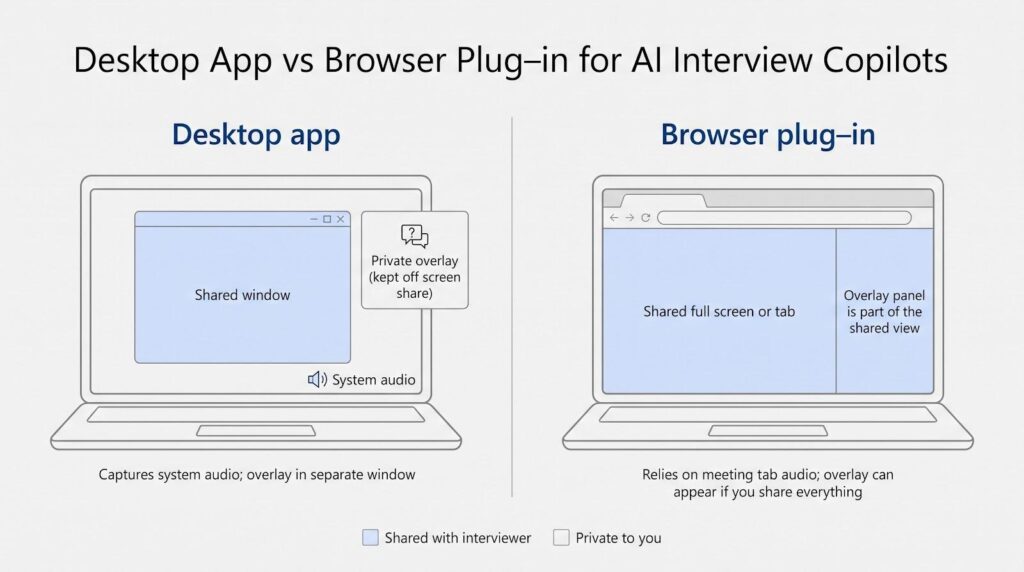
Native desktop app vs. browser tab
A native macOS or Windows app taps the same system-audio stream Zoom, Google Meet, or Teams records. This can reduce transcription latency compared with a browser plug-in on the same Wi-Fi network. Because the overlay sits in its own window, you can keep it outside the region you share.
Browser extensions install quickly (handy on company-managed laptops that block new apps), but they rely on the meeting platform’s tab or window audio. Share your whole display and the panel can become part of the broadcast; a Mozilla bug report notes that even a sharing-indicator overlay is visible to viewers when you present the entire screen. Some tools try CSS masking, yet a simple drag or platform update can break the cloak.
Bottom line: choose a desktop app when you control the machine; pick a browser plug-in only if installs are blocked and you can limit sharing to a single window. Either way, run a two-minute rehearsal (whole screen, single window, and browser tab) to see exactly what the interviewer will see.
Answer speed is not the same as answer usefulness
A transcript that lands 300 ms faster is worthless if the cue is wrong. Focus on the time to the first usable talking point, one that captures the full question, recognizes who is speaking, and draws details from your résumé. Conversation-analysis research shows that humans typically leave only approximately 200 ms between turns, so a tool that takes four or five seconds but delivers the right prompt still keeps you inside a natural pause. What matters is the blend of speed and context. Résumé-aware engines remind you of that 120-store inventory-tracking rollout; shallow detectors recycle generic lines like “highlight teamwork.” Judge relevance first, millisecond bragging rights second.
Use your own experience, not invented stories
AI can speak with confidence, but confidence crumbles if the facts do not survive a follow-up probe. Recruiters flag answers that lack dates, metrics, or teammate names. Guard against that by pre-loading verifiable bullet points: project size, dollar impact, technologies, and the year it shipped.
Before the call, open the assistant’s Context or Memory panel and paste only achievements you can defend. During the interview, treat each on-screen cue as a reminder, then answer in your own cadence. A prompt like “mention the 120-store inventory rollout” should spark an authentic anecdote, not supply a script that collapses when the interviewer digs deeper.
Check the real price, and the session clock
That “from $25 per month” badge often assumes you pre-pay a full year. Final Round’s $25 a month is its yearly plan, paid as one charge of about $300; the month-to-month plan costs far more. Other vendors flip the game: low hourly rates hide a five-credit minimum.
Before you pay, confirm:
- Billing cadence. Is the charge monthly or annual, and is it collected all at once?
- Time accounting. Does a 60-minute cap reset each meeting, or does a credit start draining the moment you join? At Parakeet, one $38 credit covers 60 minutes of calls, used in 30-minute halves.
- Carry-over and refunds. AceRound minutes never auto-renew but expire after the pass length.
Screenshot the total cost, note the renewal date in your calendar, and read the refund clause before you click “Pay.”
Read the privacy policy: every line matters
An interview call can expose more than small talk. Résumé details, client names, and shared-screen code can all traverse third-party clouds once an assistant starts transcribing. Vendors promise “secure” handling, yet fine print differs sharply. Check four items before you buy (prices and policies verified 22 Oct 2026):
- Audio retention. AceRound deletes recordings after 30 days; Final Round may use selected customer data, including transcripts, for model training.
- Model providers. Parakeet names OpenAI, Anthropic, Google, AWS, and Cerebras, which is transparent, but it means your data may cross several clouds.
- Training rights. Interview Copilot says live interview audio is streamed for transcription and not stored, while Verve is silent on training use. Final Round and some smaller tools reserve that right.
- Deletion tools. AceRound lets you delete your account yourself from its dashboard; other vendors handle deletion through their support teams.
Once you know where your information travels, match the risk to the conversation. A public side-project demo might tolerate a 30-day retention window; a confidential M&A discussion may justify a local-only coach like Hedy, or no live helper at all.
Ask what the employer allows
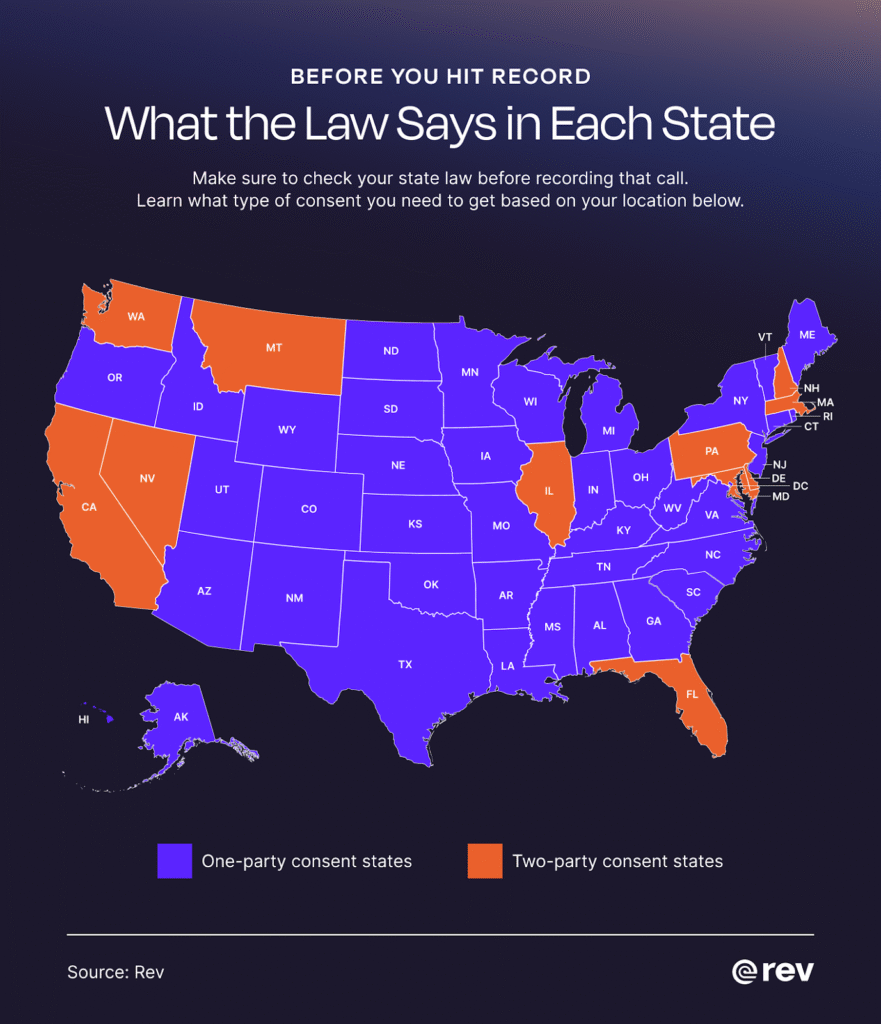
US All-Party Consent States Map for Call Recording Laws
Many companies now spell out what counts as fair play. McKinsey, for instance, tells candidates taking its Solve assessment that they may not use “applications, websites, AI tools, or pre-prepared notes.” Break that rule and you may be excluded from consideration.
Check two things before every interview:
- Employer guidelines. Scan the recruiter FAQ or candidate guide for phrases like “unauthorized software” or “no third-party prompts.” If you see them, leave the live copilot off.
- Recording consent. The Digital Media Law Project counts eleven states that require every party’s consent to record a call, including California, Connecticut, Florida, Illinois, Maryland, Massachusetts, Montana, New Hampshire, Pennsylvania, and Washington. According to ConduitApp, an assistant that captures audio without notice can violate wiretapping statutes as well as trust.
When unsure, disclose: “I’m running an on-device note-taker, let me know if that is a concern.” Openness beats surprise and keeps the conversation on your qualifications rather than your tooling.
Frequently asked questions
What is the best AI for an online interview?
For a one-laptop, unlimited-session setup, Interview Copilot tops our 2026 ranking thanks to résumé-aware prompts and a private overlay. If you need a no-card trial, Verve AI offers three 15-minute sessions. Privacy-first candidates often pick Hedy AI because audio stays on the device by default.
Can an AI assistant run on the same machine as Zoom?
Yes, as long as it captures system audio (desktop app) or the meeting-tab stream (browser plug-in). All six finalists do this on macOS and Windows, but you should still test whole-screen and window sharing to confirm what the interviewer sees.
Will the interviewer notice?
A hidden overlay usually stays off recordings and screen shares, yet eye movement, delayed answers, and follow-up probing can still reveal assistance. Treat the tool as a cue card, not invisibility gear.
Is using AI during a job interview allowed?
Employer rules differ. Some, like McKinsey, bar AI tools during their candidate assessments, while certain startups allow it if you declare it first. Read the recruiter’s FAQ and ask when in doubt.
Where can I try a live copilot for free?
- Verve AI: three 15-minute live sessions
- AceRound AI: 30 free minutes after install
- Hedy AI: five coaching hours per month (overlay is visible if you share the whole screen)
Which tool handles coding interviews best?
Interview Copilot, Parakeet, AceRound, and Final Round parse live code editors and system-design diagrams. Copilot includes coding in its base $49 plan; Parakeet and AceRound charge by credit or pass.
Can ChatGPT replace a dedicated copilot?
ChatGPT is excellent for practice prompts, but it lacks automatic question detection, private overlays, and résumé integration, so you would still juggle copy-paste windows mid-call.
What if I’m on a locked-down work laptop?
If installs are blocked, try a browser mode such as Verve Web or Parakeet’s Chrome plug-in, but remember that browser overlays can appear when you share the entire screen. In strict environments, prep-only tools are safer than live copilots.
Conclusion
Live AI copilots can shorten prep time and steady nerves, but they differ sharply in cost, privacy, and platform support. Match the assistant to your budget, device freedom, and employer policy, then rehearse a full-screen share before the real call. That small test ensures your cue cards stay private while you focus on proving you’re the right hire.